

OpenCodeCommit
AI commit, branch, PR, and changelog generation through terminal AI CLIs and APIs.
Available on
Install
VS Code / VSCodium extension
Search for OpenCodeCommit in the VS Code or VSCodium marketplace.
CLI (Rust or npm)
Install the occ CLI with cargo or npm. The same binary powers the TUI and the CI/CD scanner.
$ cargo install opencodecommit$ npm i -g opencodecommitHighlights
- •Mixed fallback chains across CLI and API backends from one backend / backend-order config.
- •Commit, PR, branch, and changelog generation share one config surface across the CLI, TUI, and extension.
- •occ scan for CI/CD with text, json, sarif, and github-annotations output modes.
- •Built-in languages: English, Finnish, Japanese, Chinese, Spanish, Portuguese, French, Korean, Russian, Vietnamese, German.
- •Terminal TUI with one-shot backend picks and a file sidebar that stages or unstages with Space.
- •Transparent git guard for normal git commit flows.
- •Optional repo-local evidence trails and Assisted-by AI attribution for SaMD and defence audits.
Local secrets scanner
Before any prompt leaves your machine, OpenCodeCommit scans the diff locally for provider tokens, bearer tokens, JWTs, .env files, kube and cloud credentials, private keys, and exposed source maps. occ scan reuses the same scanner outside the AI flow for CI/CD pipelines.
Enforcement modes
warnblock-highblock-allstrict-highstrict-allEvidence & audit trail
Opt-in, repo-local audit trails for Software as a Medical Device (SaMD) and defence software. Each commit records a snapshot of the repository and build environment behind a compact git trailer — the samd profile redacts sensitive values and stays safe to commit, while defence collects all-in cleartext machine and network state for private, access-controlled stores.
Profiles
samddefenceStorage
localrepoartifactWhat it captures
Repo state, tool and AI-agent versions, environment, and network and security state — scoped by profile. Each sidecar is scanned for secrets before it is written.
feat(monitor): clamp ECG sampling window

OCC-Evidence: repo:.occ/evidence/2026/06/20260623T091205Z-a1b2c3d.toml
Assisted-by: Codex 0.133.0:gpt-5.5
Assisted-by: Claude Code 2.1.0:claude-opus-4.8
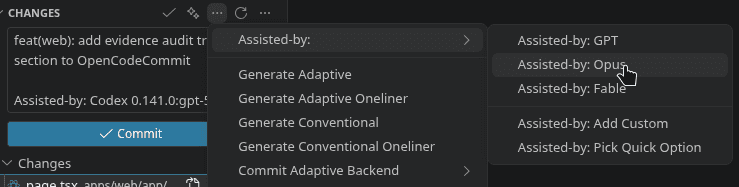
$ occ evidence install --profile samd$ occ evidence snapshotQuick start
A handful of commands that cover the daily flow. The CLI, TUI, and extension all share the same config in ~/.config/opencodecommit/config.toml.
$ occ tui$ occ commit$ occ pr --backend openrouter-api --text$ occ scan --format sarif --output occ-scan.sarif$ occ guard install --globalConfig
~/.config/opencodecommit/config.toml is the single source of truth for both the CLI and the extension. VS Code / VSCodium settings under opencodecommit.* sync bidirectionally with the file.
backend = "openai-api"
backend-order = ["claude", "openai-api", "ollama-api"]

[api.openai]
model = "gpt-5.4-mini"
endpoint = "https://api.openai.com/v1/chat/completions"
key-env = "OPENAI_API_KEY"
pr-model = "gpt-5.4"
cheap-model = "gpt-5.4-mini"

[api.ollama]
model = ""
endpoint = "http://localhost:11434"
key-env = ""